


一句话定位:Let AI agents use your real, logged-in browser without interrupting your work. CLI + extension for browser automation across any shell-capable AI agent.。这是 GitHub 上同类项目里热度前列的一个(10.7k Star),本文按本站项目库口径做拆解:它解决什么问题、怎么装、优缺点与适合人群。本站未亲测,数据来自 GitHub 公开页面(采集于 2026 年 11 月),结论以「数据事实 + 通用理性分析」为准。
它解决什么问题
AI 浏览器自动化赛道这两年爆发,BrowserSkill 的切入点是:Let AI agents use your real, logged-in browser without interrupting your work. CLI + extension for browser automation across any shell-capable AI agent.。标签:agent、browser-use、dsh-plugin。主要语言:TypeScript,许可证:MIT,最近更新:2026-11-24——更新活跃度是判断这类项目能不能跟的第一指标,它在这一点上达标。
功能结构(据项目文档目录)
- See it in action
- Bring the agent you already use
- What you can do
- Quick Start
- Let your agent set it up
- # 1. Install the CLI
热度与生态数据
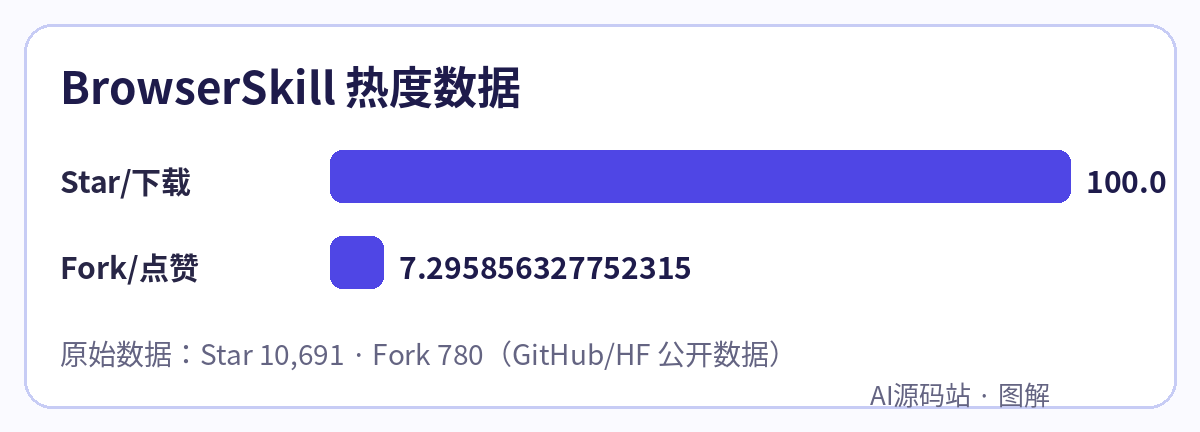
- Star:10,691;Fork:780(Fork 数高说明二次开发的人多,生态通常更耐用)
- 仓库:github.com/Tencent/BrowserSkill
- 本站镜像:点击下载本站镜像(源码包)(国内直连高速,不用去 GitHub 慢慢拉) · GitHub 原仓库;镜像文件由发布流水线同步生成,若个别大仓库暂缺,点原仓库下载
- 本站拉取(Git 克隆):
git clone https://dl.yuanmazhan.net/git/browserskill.git——国内直连 GitHub 拉不动时用这个地址,代码与原仓库一致;本站镜像为定期同步快照,要追最新版用上方 GitHub 原仓库
安装上手
按项目官方 README 的方式起步(原文命令):
The guide covers CLI installation, skill setup, connection checks, and a first browser task. You will still need to install the extension in the browser you want to use:

**[Install for Chrome](https://chromewebstore.google.com/detail/hhcmgoofomhgciiibhipgmgkgnoenaoi)** · **[Install for Edge](https://microsoftedge.microsoft.com/addons/detail/browserskill/emacgiaaaiojkkpkddmmdfhmokgmnikg)**

<details>
<summary><b>Manual setup</b></summary>

#### 1. Install the CLI

macOS / Linux:
装完先把示例跑通,再动配置——这类项目九成的坑出在环境变量与模型 Key 没填对。
优点与缺点(通用理性分析)
- 优点:开源可控、社区规模摆在数据里;TypeScript 技术栈对国内开发者友好;许可证 MIT 决定了商用边界,接入前先确认
- 缺点:这类项目迭代快、文档跟不上代码是通病;真要用于生产,模型费用、并发与安全(Key 管理、权限)都得自己兜底
适合谁
想把 AI 浏览器自动化 落地到自己业务/社群/工作流里的开发者与站长。先收藏本页,本站会跟踪它的版本变化与插件生态,有重大更新会在文末追加。
© Copyright Notice
文章版权归作者所有,未经允许请勿转载。
THE END












Please log in to view comments